Friday, 10 September 2021

Send email along with attachment in AX 2009 without batch processing

 Today, I will be sharing the code snippet which can utilized to send email along with attachment in a job in AX 2009. 

We will use System.Net.Mail framework and configured email parameters in the AX 2009.

To fill in parameters we will use the form available on this path : Administration > Administration Area > Setup > E-mail parameters.

Code snippet.

static void TestEmai1(Args _args)

{

    System.Net.Mail.MailMessage             mailMessage;

    System.Net.Mail.Attachment              attachment;

    System.Net.Mail.AttachmentCollection    attachementCollection;

    System.Net.Mail.SmtpClient              smtpClient;

    System.Net.Mail.MailAddress             mailAddressFrom;

    System.Net.Mail.MailAddress             mailAddressTo;

    str                                     Body;

    str                                     Subject;

    str                                     SMTPServer;

    str                                     FileName;

    FileIOPermission                        perm;

    ;


    mailAddressFrom = new System.Net.Mail.MailAddress("sender email","");

    mailAddressTo = new System.Net.Mail.MailAddress("recipient email","");

    Body = "<B>Body of the email</B>";

    Subject = "Subject line for the email";

    SMTPServer = SysEmailParameters::find(false).SMTPRelayServerName;


    mailMessage = new System.Net.Mail.MailMessage(mailAddressFrom, mailAddressTo);

    mailmessage.set_Subject(Subject);

    mailmessage.set_Body(Body);

    attachementCollection = mailMessage.get_Attachments();


    // Add attachemnts! use double slashes ("\") in the filename path.

    FileName = "D:\\test.xlsx";

    perm = new FileIOPermission(FileName,'w');

    perm.assert();


    attachment = new System.Net.Mail.Attachment(FileName);

    attachementCollection.Add(attachment);

    smtpClient = new System.Net.Mail.SmtpClient(SMTPServer);

    smtpClient.Send(mailmessage);


    CodeAccessPermission::revertAssert();


}

Expected output: 


Tuesday, 12 January 2021

Find the list of menuitems assigned to particular privilege in D365 F&O

 Today, I will be discussing out about how to fetch the list of menu items assigned to particular privilege using X++. In AX 2012 this data was stored was on table level. However,  in D365 F&O we will be using metadata API to get this information.

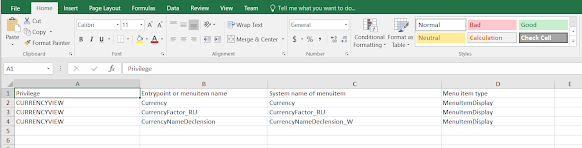
Below is the code snippet of it. The code will extract the list of all menu items which are covered under privilege 'CurrencyView' and it will export data in excel sheet. The excel sheet will contain following information : 

- Privilege

- Entry point (Menu item)

- System name of  menu item

- Menu item type


using Microsoft.Dynamics.ApplicationPlatform.Environment;

using Microsoft.Dynamics.AX.Metadata.Storage;

using Microsoft.Dynamics.AX.Metadata.Storage.Runtime;

using Microsoft.Dynamics.AX.Metadata.MetaModel;

using System.IO;

using OfficeOpenXml;

using OfficeOpenXml.Style;

using OfficeOpenXml.Table;

class Test_GetMenusForPrivilege

{

    public static void main(Args _args)

    {

        str packageDir = EnvironmentFactory::GetApplicationEnvironment().Aos.PackageDirectory;

        var providerConfig = new RuntimeProviderConfiguration(packageDir);

        var provider = new MetadataProviderFactory().CreateRuntimeProvider(providerConfig);

        SecurityPrivilege   secPrivilege;

        MemoryStream memoryStream = new MemoryStream();


        using (var package = new ExcelPackage(memoryStream))

        {

            var currentRow = 1;

            var worksheets = package.get_Workbook().get_Worksheets();

            var CustTableWorksheet = worksheets.Add("Export");

            var cells = CustTableWorksheet.get_Cells();

            OfficeOpenXml.ExcelRange cell = cells.get_Item(currentRow, 1);

            System.String value = "Privilege";

            cell.set_Value(value);

            cell = null;

            value = "Entrypoint or menuitem name";

            cell = cells.get_Item(currentRow, 2);

            cell.set_Value(value);

            cell = null;

            value = "System name of menuitem";

            cell = cells.get_Item(currentRow, 3);

            cell.set_Value(value);

            cell = null;

            value = "Menu item type";

            cell = cells.get_Item(currentRow, 4);

            cell.set_Value(value);


            while select Identifier from secPrivilege

            where secPrivilege.Identifier == "CurrencyView"

            {

                AxSecurityPrivilege privilege = provider.SecurityPrivileges.Read(secPrivilege.Identifier);

                var enumerator = privilege.EntryPoints.GetEnumerator();


                while (enumerator.MoveNext())

                {

                    currentRow ++;

                    cell = null;


                    cell = cells.get_Item(currentRow, 1);

                    cell.set_Value(secPrivilege.Identifier);


                    AxSecurityEntryPointReference entryPoint = enumerator.Current;

                    cell = null;

                    cell = cells.get_Item(currentRow, 2);

                    cell.set_Value(entryPoint.Name);


                    cell = null;

                    cell = cells.get_Item(currentRow, 3);

                    cell.set_Value(entryPoint.ObjectName);


                    cell = null;

                    cell = cells.get_Item(currentRow, 4);

                    cell.set_Value(entryPoint.ObjectType);

                }

            }

            package.Save();

            file::SendFileToUser(memoryStream, "PrivilegeWithMenuItems");


        }   

    }

}


Output file


Monday, 24 February 2020

How to call external class method in enterprise portal

Today, I will be discussing about how to call external class method in enterprise portal.
There was a requirement in which we need to update some information on updating the vendor account within purchase requisition web page on enterprise portal.

For changing this target i created a new class and added a static method inside it. This class was created with in AX and names as PRTestHelper class.

Class: PRTestHelper
Static Method : updateVendorAccount

Now we need to add override the ondatachanged method of vendor account field in PurchReqLineInfo_ascx_cs. Add following code in the class.

 protected void VendAccount_DataChanged(object sender, AxBoundFieldDataChangedEventArgs e)
{
        this.setupDefaultDimension(true);
       
       
        if (Page.IsPostBack)
        {
            Page.Validate();
            if (Page.IsValid)
            {
                DataSetViewRow row;

                row = this.PurchReqLineDS.GetDataSet().DataSetViews["PurchReqLine"].GetCurrent();
                this.AxSession.AxaptaAdapter.CallStaticClassMethod("PRTestHelper", "updateVendorAccount", row.GetFieldValue("RecId"), row.GetFieldValue("VendAccount"));
                DialogHelper.Close(CloseDialogBehavior.RefreshPage);
            }
        }
       
   }


// Following code is used to call method :  this.AxSession.AxaptaAdapter.CallStaticClassMethod("PRTestHelper", "updateVendorAccount", row.GetFieldValue("RecId"), row.GetFieldValue("VendAccount"));

First parameter is : Class name
Second parameter is : Method name
Third parameter is : RecId of Purchase Requisition line
Fourth parameter is : Vendor account

Note : 3rd and 4th parameter are optional as we are using them to send parameter to static method.

How to find web controls in Enterprise portal (EP)

Today , I will be discussing about the approach through which we can find out the web controls of enterprise portal.

Lets take an example of Purchase Requisition web page in Enterprise portal.

1) Go to Enterprise portal -> Purchase Requisition tab -> Click on one of the Purchase requisition

2) Click on Page tab


3) Click on Edit page drop down and select edit page option.


4) Click on drop arrow and select edit web part. The name within managed content item is web control name.


Dynamics 365 F&O - Changes in financial dimension structure methods as compared to AX 2012

Today , I will be discussing about the changes of methods which are commonly used for financial dimension or ledger dimension development using X++.
There are number of methods which have been moved from DimStorage class to other classes in D365 F&O.
Here is the list of those methods.


Thursday, 9 January 2020

Unable to find w3wp process for debugging in Visual studio

Today, I will be discussing about one of the common issue which i faced while attaching the process for debugging in visual studio for D365 F&O project.

I was quite usual that i was unable to find out w3wp.exe process on Attach process screen in visual studio for debugging. Even though VS was running as administrator and i have marked the check box of show all process.

So, this issue usually occurs because when you install  the visual studio then IIS express is the default web server for web applications projects. That's why you visual studio is not using local IIS for running local applications instead of this it is using IIS express.

Workaround for it : Attach iisexpress.exe process instead of w3wp.exe. 


Adding a dataset lookup on purchase requisition form in EP

Today, I will be discussing about one of the issue which  any one has encountered while adding a lookup on data set and it is not visible in EP specially on Purchase Requisition details form. So I will be sharing here the code snippet which can used to show that data set lookup for any field.

void dataSetLookup(SysDataSetLookup _sysDataSetLookup)
{
     Query      query;
     TableId    lookupTableNum;

     lookuptablenum = tableNum(PurchReqTable);

    _sysDataSetLookup.parmLookupFields(new List(Types::String));
    _sysDataSetLookup.parmLookupFields().addEnd(fieldStr(PurchReqTable,PurchReqId));
    _sysDataSetLookup.parmLookupFields().addEnd(fieldStr(PurchReqTable,TestField1));
    _sysDataSetLookup.parmLookupFields().addEnd(fieldStr(PurchReqTable,PurchReqId));
    _sysDataSetLookup.parmLookupFields().addEnd(fieldStr(PurchReqTable,Originator));
    _sysDataSetLookup.parmSelectField(fieldStr(PurchReqTable,TestField1));

    query = new Query(queryStr (PurchReqTableListPage));
    query.dataSourceNo(1).addRange(fieldNum(PurchReqTable,TestField1type)).value(enum2str(RequisitionType::Type1));
    query.dataSourceNo(1).addRange(fieldNum(PurchReqTable,RequisitionStatus)).value(enum2str(PurchReqRequisitionStatus::Approved));
    query.dataSourceNo(1).addRange(fieldNum(PurchReqTable,BlanketOnHold)).value(enum2str(NoYes::no));

    query.allowCrossCompany(true);

    _sysDataSetLookup.parmQuery(query);
    _sysDataSetLookup.parmDataSet(SysDataSetBuilder::constructLookupDataSet(lookupTableNum).toDataSet());
}

Note : This construct method is quite helpful in showing lookup

Custom Business events Part 3 - (Activate custom business event) in D365 F&O

 In this blog we will discuss about the steps to activate a custom business in D365 F&O. As we know that business event catalog does not...