Tuesday, 14 September 2021

SQL Query to get security details (such as Security roles, duties and privileges)

 Today, I will sharing out the list of queries which can used to get the security details.

It will cover following combinations of data.

  • Security roles
  • Security roles to duties
  • Security roles with privileges
  • Security role and duty combination along with privileges
Following list of tables are used in it.
  • SECURITYROLES
  • SECURITYOBJECTCHILDREREFERENCES
  • SECURITYDUTY
  • SECURITYPRIVILEGE

-- Get the list  of all security roles 
Select Name as SecurityRoleName FROM SecurityRole;

-- Get the list of all security roles to duties
SELECT T2.Name as SecurityRole, T3.NAME as Duty 
FROM SECURITYOBJECTCHILDREREFERENCES T1 
JOIN SECURITYROLE T2 ON T1.IDENTIFIER = T2.AOTNAME 
JOIN SECURITYDUTY T3 ON T1.CHILDIDENTIFIER = T3.IDENTIFIER
WHERE T1.OBJECTTYPE = 0 AND T1.CHILDOBJECTTYPE = 1 ;

-- Get the ;ist of all security roles with privileges 
SELECT T2.Name as SecurityRole, T3.NAME as Privileges
FROM SECURITYOBJECTCHILDREREFERENCES T1 
JOIN SECURITYROLE T2 ON T1.IDENTIFIER = T2.AOTNAME 
JOIN SECURITYPRIVILEGE T3 ON T1.CHILDIDENTIFIER = T3.IDENTIFIER
WHERE T1.OBJECTTYPE = 0 AND T1.CHILDOBJECTTYPE = 2 ;


-- Get the list of all role-duty combination with privilege 
SELECT T2.Name as SecurityRole, T2.AOTNAME as RoleSystemName,  T3.NAME AS Duty, T3.IDENTIFIER as DutySystemName, T5.NAME as Privilege, T5.IDENTIFIER as PrivilegeSystemName
FROM SECURITYOBJECTCHILDREREFERENCES T1 
JOIN SECURITYROLE T2 ON T1.IDENTIFIER = T2.AOTNAME 
JOIN SECURITYDUTY T3 ON T1.CHILDIDENTIFIER = T3.IDENTIFIER
JOIN SECURITYOBJECTCHILDREREFERENCES T4 on T4.IDENTIFIER = T3.IDENTIFIER
JOIN SECURITYPRIVILEGE T5 on T4.CHILDIDENTIFIER = T5.IDENTIFIER
WHERE T1.OBJECTTYPE = 0 AND T1.CHILDOBJECTTYPE = 1 
AND T4.OBJECTTYPE = 1 AND T4.CHILDOBJECTTYPE = 2;

Friday, 10 September 2021

Read JSON file data in AX 2009 using batch processing

Today, I will share the code snippet which can be used to read a json
file in AX 2009.

We will be using .NET Newtonsoft.Json.dll file to proceed with this work.

Download the Newtonsoft.Json.dll  and place it on this path : D:\Program Files (x86)\Microsoft Dynamics AX\50\Client\Bin.


We will create a new class with name as 'JSONReaderWrapper' and add following methods in it.

class JSONReaderWrapper
{
   Newtonsoft.Json.Linq.JObject    jObject;
}

//Add these methods
public int getIntNode(str path)
{
    return this.traversePath(path);
}

public real getRealNode(str path)
{
    return this.traversePath(path);
}
public str getStringNode(str path)
{
    return System.Convert::ToString(this.traversePath(path));
}
public boolean isFound(str _path)
{
    return this.traversePath(_path) != null;
}
public void loadJson(str _json)
{
    ;
    jObject = Newtonsoft.Json.Linq.JObject::Parse(_json);
}

public static JSONReaderWrapper parseJson(str _json)
{
    JSONReaderWrapper reader = new JsonReader();
    ;

    reader.loadJson(_json);
    return reader;
}
private anytype traversePath(str                               path,
                             Newtonsoft.Json.Linq.JContainer   obj = jObject)
{
    List                            pathElements;
    ListEnumerator                  le;
    Newtonsoft.Json.Linq.JValue     value;
    Newtonsoft.Json.Linq.JToken     token;
    Newtonsoft.Json.Linq.JTokenType thisType,
                                    nestedType;
    Newtonsoft.Json.Linq.JObject    newObject;
    Newtonsoft.Json.Linq.JArray     newArray;
    str                             current,
                                    thisTypeString,
                                    nestedTypeString;

    #define.JObject("Newtonsoft.Json.Linq.JObject")
    #define.JArray ("Newtonsoft.Json.Linq.JArray")

    ;

    pathElements = strSplit(path, @".\/");

    le = pathElements.getEnumerator();

    if (le.moveNext())
    {
        current = le.current();

        thisType = obj.GetType();
        thisTypeString = thisType.ToString();

        switch (thisTypeString)
        {
            case #JObject:
                token = obj.get_Item(current);
                break;
            case #JArray:
                token = obj.get_Item(str2int(current) - 1);
                break;
            default:
                return null;
        }

        if (token)
        {
            nestedType = token.GetType();
            nestedTypeString = nestedType.ToString();

            if (nestedTypeString != #JObject && nestedTypeString != #JArray)
            {
                switch (thisTypeString)
                {
                    case #JArray:
                        return obj.get_Item(str2int(current) - 1);
                    case #JObject:
                        return obj.get_Item(current);
                    default:
                        return null;
                }
            }

            switch (nestedTypeString)
            {
                case #JObject:
                    newObject = Newtonsoft.Json.Linq.JObject::FromObject(token);
                    return this.traversePath(strDel(path, 1, strLen(current) + 1), newObject);
                case #JArray:
                    newArray = Newtonsoft.Json.Linq.JArray::FromObject(token);
                    return this.traversePath(strDel(path, 1, strLen(current) + 1), newArray);
                default:
                    return null;
            }
        }
        else
        {
            return null;
        }
    }
    else
    {
        return null;
    }
}

//Create another class which extends RunBaseBatch and add a method in it.

Json input string  = "{\"ItemDef\":[{\"ItemId\":\"Test1\",\"Price\":1},{\"ItemId\":\"Test2\",\"Price\":2},{\"ItemId\":\"Test3\",\"Price\":3}]}";
client server static  void readJsonFileData(str _jsonInput)
{
    str              jsonResult;
    System.Exception ex;
    str              itemId;
    str              quantity;
    str              conditionCode;
    real             intResult;
    container        jsonConResult;
    int              i;
    JSONReaderWrapper   reader;
;


    try
    {
        jsonResult = _jsonInput;

        new InteropPermission(InteropKind::ClrInterop).assert();

        reader = JSONReaderWrapper::parseJson(jsonResult);

        for (i = 1; reader.isFound(strfmt("ItemDef.%1.ItemId", i)); i++)
        {
            itemId = reader.getStringNode(strfmt("ItemDef.%1.ItemId", i));
             price = reader.getIntNode(strfmt("ItemDef.%1.Price", i));
             info(strfmt("%1 = %2", itemId, price));

        }


     }
     catch(Exception::CLRError)
     {
        ex = CLRInterop::getLastException().GetBaseException();
        error(ex.get_Message());
     }

}

Read files from folder in AX 2009 with batch processing

 Today, I will be discuss out how to read files from folder in AX 2009.

Below is the code snippet which can be used to read files from folder in ax 2009 using batch job.

public void readFilesFromFolder()

{

    #Evat_NL

    #File

    Filename                        baseFolder;

    Filename                        filename;

    Filename                        foundBaseFileNameVal;

    int                             itemCounter;

    System.IO.DirectoryInfo         directoryFolder;

    System.IO.FileInfo[]            files;

    System.IO.FileInfo              filelist;

    InteropPermission               permission;

    counter                         filesCount;

    counter                         i;

   ;

     filePath      = "D:\\MJ\\Test";


    permission  = new InteropPermission(InteropKind::ClrInterop);

    permission.assert();


    baseFolder = filePath;

    directoryFolder  = new System.IO.DirectoryInfo(baseFolder);

    files      = directoryFolder.GetFiles("*.json");  //Depending upon file type

    filesCount = files.get_Length();


    for (i = 0; i < filesCount; i++)

    {

        filelist               = files.GetValue(i);

        fileName        = filelist.get_FullName();

        foundBaseFileNameVal  = filelist.get_Name();


       if (System.IO.File::Exists(FileName))

       {

            //Read txt from file

       }

    }


       CodeAccessPermission::revertAssert();


}

Create JSON file in AX 2009

 Today, I will share the code snippet which can be used to create a json file in AX 2009.

We will be using .NET Newtonsoft.Json.dll file to proceed with this work.

Download the Newtonsoft.Json.dll  and place it on this path : D:\Program Files (x86)\Microsoft Dynamics AX\50\Client\Bin.


Below is the code snippet to create JSON file.

static void DataExtractToJSON(Args _args)

{

    Dialog                  dialog;

    FilePath                filepath;

    DialogField             dialogFilePath;

    InventSum               inventSum;

    InventDim               inventDim;

    WMSLocation             wmsLocation;

    InventTable             inventTable;

    InventDimParm           invDimParm;

    Qty                     availPhys;

    str                     lpnnumber, lpnconstant, filename;

    int                     lpnCounter, lpnLen;

    date                    consumptionPriorityDate,expirationDate,manufacturedDate;


    TextIO                  file;

    FileIOPermission        fileIOPermission;

    container               line,header,header2;

    Newtonsoft.Json.Linq.JTokenWriter       writer;

    Newtonsoft.Json.Linq.JObject            jObject;

    ClrObject                               clrObject;

    str                                     jsonStr;

    ;


    #File


    dialog = new dialog();

    dialog.caption("Select the folder to save JSON file");

    dialogFilePath = dialog.addField(typeId(FilePath));

    dialogFilePath.label('FilePath');

    dialog.run();//execute dialog


    filepath = dialogFilePath.value();//return path file value


    if (filepath)

    {

        writer = new Newtonsoft.Json.Linq.JTokenWriter();

        writer.WriteStartObject();

        writer.WritePropertyName("Items");

        writer.WriteStartArray();

        fileName = FilePath+'\\test.json';

        new FileIOPermission(Filename,'w').assert();

        file = new TextIO(Filename,#io_write,1250);


        line = connull();


        while select inventLocationId, wmsLocationId,inventLocationId,locationType from wmsLocation

           join inventSum

           join inventDim

           join inventTable

           where inventDim.inventDimId == inventSUm.InventDimId

            && inventSum.ItemId == inventTable.ItemId

            && inventDim.InventLocationId == wmsLocation.inventLocationId

            && inventDim.wMSLocationId == wmsLocation.wMSLocationId

            && inventSum.Closed == NoYes::No

            && wmsLocation.checkText == ''

            && wmsLocation.locationType == WMSLocationType::Pick 

        {

               line = connull();


               availPhys = InventSum.availPhysical();


               if ( availPhys != 0)

               {

                    writer.WriteStartObject();


                    writer.WritePropertyName('testLocation');

                    writer.WriteValue(wmsLocation.wmsLocationId);


                    writer.WritePropertyName('TestType');

                    writer.WriteValue('LOCATION');


                    writer.WritePropertyName('TestTransactionType');

                    writer.WriteValue('INVENTORY_ADJUSTMENT');


                    writer.WritePropertyName('TestItemId');

                    writer.WriteValue(inventTable.ItemId);


                    writer.WritePropertyName('TestQty');

                    writer.WriteValue(availPhys);


                    writer.WriteEndObject();

               }

        }


        writer.WriteEndArray();

        writer.WriteEndObject();


        clrObject   = writer.get_Token();

        jObject     = clrObject;


        jsonStr = jObject.ToString();


        file.write(jsonStr);

        info(jObject.ToString());


        if(dialog.closedOk())

        {

            info(strfmt("Please check the JSON file on this path %1", filename));


        }


    }

}


Output :


Send an email with attachment in AX 2009 with batch processing

 Today, I will be sharing the code snippet which can utilized to send email along with attachment in a batch job in AX 2009. 

We will be using standard mail mechanism of the system and will utilize  SysOutgoingEmailTable and SysOutgoingEmailData tables.

Following are perquisites for the this process: 

  • Email parameters filled in : Administration > Administration Area > Setup > E-mail parameters.


  • Email distributor batch must be running : Administration > Administration Area > Periodic > E-mail processing > Batch.

  • A class which extends RunBaseBatch and add a method in it which will have below code snippet.
void sendEmail()
{
    SysOutgoingEmailTable       outgoingEmailTable;
    SysEmailItemId              nextEmailItemId;
    Map                         map;
    str                         SenderName, SenderEmail, To, Subject, Body;
    SysOutgoingEmailData        outgoingEmailData;
    FileIOPermission            fileIOPermission;
    InteropPermission           interopPermission;
    BinData                     binData;
    FileName                    attachmentFileName;
    SysEmailParameters          emailParams;
    int                         maxAttachmentSize;
    str                         tmpPath;
    str                         filePath;
    str                         fileName;
    str                         fileExtension;
    container                   attachmentData;
;

    try
    {

        SenderName    = "Tester";
        SenderEmail   = "test@gmail.com";
        To            = "test@gmail.com";
        Subject       = "Subject  for test ";
        Body          = "test email";
        
        //Email parameters
        emailParams       = SysEmailParameters::find();
        maxAttachmentSize = emailParams.MaxEmailAttachmentSize;
        
        ttsbegin;
        nextEmailItemId                  = EventInbox::nextEventId();
        outgoingEmailTable.EmailItemId   = nextEmailItemId;
        outgoingEmailTable.IsSystemEmail = NoYes::No;
        outgoingEmailTable.Sender        = SenderEmail;
        outgoingEmailTable.SenderName    = SenderName;
        outgoingEmailTable.Recipient     = To;
        outgoingEmailTable.Subject       = SysEmailMessage::stringExpand(Subject, map);
        outgoingEmailTable.Priority      = eMailPriority::Normal ;
        outgoingEmailTable.WithRetries   = false;
        outgoingEmailTable.RetryNum      = 0;
        outgoingEmailTable.UserId        = curUserId();
        outgoingEmailTable.Status        = SysEmailStatus::Unsent;
        outgoingEmailTable.Message       = Body;
        outgoingEmailTable.LatestStatusChangeDateTime = DateTimeUtil::getSystemDateTime();
        outgoingEmailTable.insert();

        attachmentFileName = 'D:\\test.xlsx';

        fileIOPermission = new FileIOPermission(attachmentfileName,'r');
                                    fileIOPermission.assert();

        if(WinAPIServer::fileExists(attachmentfileName) && (WinAPIServer::fileSize(attachmentfileName) < (maxAttachmentSize * 1000000)))
        {
            binData = new BinData();
            binData.loadFile(attachmentfileName);
            attachmentData = binData.getData();
        }

         CodeAccessPermission::revertAssert();
         
         //Add attachment record
         outgoingEmailData.EmailItemId       = nextEmailItemId;
         outgoingEmailData.DataId            = 1;
         outgoingEmailData.EmailDataType     = SysEmailDataType::Attachment;
         outgoingEmailData.Data              = attachmentData;
         [filePath, filename, fileExtension] = Global::fileNameSplit(attachmentfileName);
         outgoingEmailData.FileName          = filename;
         outgoingEmailData.FileExtension     = fileExtension;
         outgoingEmailData.insert();

         ttscommit;
     }
     catch
     {
        throw error("Failed to send email");
     }

}

Output :
Check your batch job status in the Basic > Basic Area > Common Forms > Batch job list- User.
Check your email status : Administration > Administration Area > Periodic > E-mail processing > E-mail sending status. 


Send email along with attachment in AX 2009 without batch processing

 Today, I will be sharing the code snippet which can utilized to send email along with attachment in a job in AX 2009. 

We will use System.Net.Mail framework and configured email parameters in the AX 2009.

To fill in parameters we will use the form available on this path : Administration > Administration Area > Setup > E-mail parameters.

Code snippet.

static void TestEmai1(Args _args)

{

    System.Net.Mail.MailMessage             mailMessage;

    System.Net.Mail.Attachment              attachment;

    System.Net.Mail.AttachmentCollection    attachementCollection;

    System.Net.Mail.SmtpClient              smtpClient;

    System.Net.Mail.MailAddress             mailAddressFrom;

    System.Net.Mail.MailAddress             mailAddressTo;

    str                                     Body;

    str                                     Subject;

    str                                     SMTPServer;

    str                                     FileName;

    FileIOPermission                        perm;

    ;


    mailAddressFrom = new System.Net.Mail.MailAddress("sender email","");

    mailAddressTo = new System.Net.Mail.MailAddress("recipient email","");

    Body = "<B>Body of the email</B>";

    Subject = "Subject line for the email";

    SMTPServer = SysEmailParameters::find(false).SMTPRelayServerName;


    mailMessage = new System.Net.Mail.MailMessage(mailAddressFrom, mailAddressTo);

    mailmessage.set_Subject(Subject);

    mailmessage.set_Body(Body);

    attachementCollection = mailMessage.get_Attachments();


    // Add attachemnts! use double slashes ("\") in the filename path.

    FileName = "D:\\test.xlsx";

    perm = new FileIOPermission(FileName,'w');

    perm.assert();


    attachment = new System.Net.Mail.Attachment(FileName);

    attachementCollection.Add(attachment);

    smtpClient = new System.Net.Mail.SmtpClient(SMTPServer);

    smtpClient.Send(mailmessage);


    CodeAccessPermission::revertAssert();


}

Expected output: 


Tuesday, 12 January 2021

Find the list of menuitems assigned to particular privilege in D365 F&O

 Today, I will be discussing out about how to fetch the list of menu items assigned to particular privilege using X++. In AX 2012 this data was stored was on table level. However,  in D365 F&O we will be using metadata API to get this information.

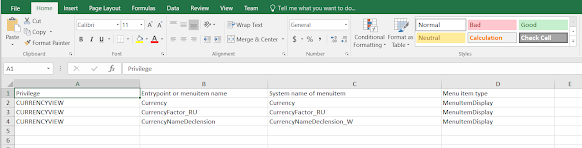
Below is the code snippet of it. The code will extract the list of all menu items which are covered under privilege 'CurrencyView' and it will export data in excel sheet. The excel sheet will contain following information : 

- Privilege

- Entry point (Menu item)

- System name of  menu item

- Menu item type


using Microsoft.Dynamics.ApplicationPlatform.Environment;

using Microsoft.Dynamics.AX.Metadata.Storage;

using Microsoft.Dynamics.AX.Metadata.Storage.Runtime;

using Microsoft.Dynamics.AX.Metadata.MetaModel;

using System.IO;

using OfficeOpenXml;

using OfficeOpenXml.Style;

using OfficeOpenXml.Table;

class Test_GetMenusForPrivilege

{

    public static void main(Args _args)

    {

        str packageDir = EnvironmentFactory::GetApplicationEnvironment().Aos.PackageDirectory;

        var providerConfig = new RuntimeProviderConfiguration(packageDir);

        var provider = new MetadataProviderFactory().CreateRuntimeProvider(providerConfig);

        SecurityPrivilege   secPrivilege;

        MemoryStream memoryStream = new MemoryStream();


        using (var package = new ExcelPackage(memoryStream))

        {

            var currentRow = 1;

            var worksheets = package.get_Workbook().get_Worksheets();

            var CustTableWorksheet = worksheets.Add("Export");

            var cells = CustTableWorksheet.get_Cells();

            OfficeOpenXml.ExcelRange cell = cells.get_Item(currentRow, 1);

            System.String value = "Privilege";

            cell.set_Value(value);

            cell = null;

            value = "Entrypoint or menuitem name";

            cell = cells.get_Item(currentRow, 2);

            cell.set_Value(value);

            cell = null;

            value = "System name of menuitem";

            cell = cells.get_Item(currentRow, 3);

            cell.set_Value(value);

            cell = null;

            value = "Menu item type";

            cell = cells.get_Item(currentRow, 4);

            cell.set_Value(value);


            while select Identifier from secPrivilege

            where secPrivilege.Identifier == "CurrencyView"

            {

                AxSecurityPrivilege privilege = provider.SecurityPrivileges.Read(secPrivilege.Identifier);

                var enumerator = privilege.EntryPoints.GetEnumerator();


                while (enumerator.MoveNext())

                {

                    currentRow ++;

                    cell = null;


                    cell = cells.get_Item(currentRow, 1);

                    cell.set_Value(secPrivilege.Identifier);


                    AxSecurityEntryPointReference entryPoint = enumerator.Current;

                    cell = null;

                    cell = cells.get_Item(currentRow, 2);

                    cell.set_Value(entryPoint.Name);


                    cell = null;

                    cell = cells.get_Item(currentRow, 3);

                    cell.set_Value(entryPoint.ObjectName);


                    cell = null;

                    cell = cells.get_Item(currentRow, 4);

                    cell.set_Value(entryPoint.ObjectType);

                }

            }

            package.Save();

            file::SendFileToUser(memoryStream, "PrivilegeWithMenuItems");


        }   

    }

}


Output file


Custom Business events Part 3 - (Activate custom business event) in D365 F&O

 In this blog we will discuss about the steps to activate a custom business in D365 F&O. As we know that business event catalog does not...